Two languages.
One clean subtitle track.
两种语言,
一层清爽字幕。
The original language and your translation on any YouTube™ video that has captions — a single, non-overlapping layer that switches cleanly, sentence by sentence. Free and open source.
在任何有字幕的 YouTube™ 视频上同时显示原文和你的译文——同一层字幕、互不重叠,逐句干净切换。免费且开源。
Also works on Edge同样支持 Edge · Chromium 111+Chromium 111+ · no account本扩展无需注册 · drawn on your machine字幕在本机绘制
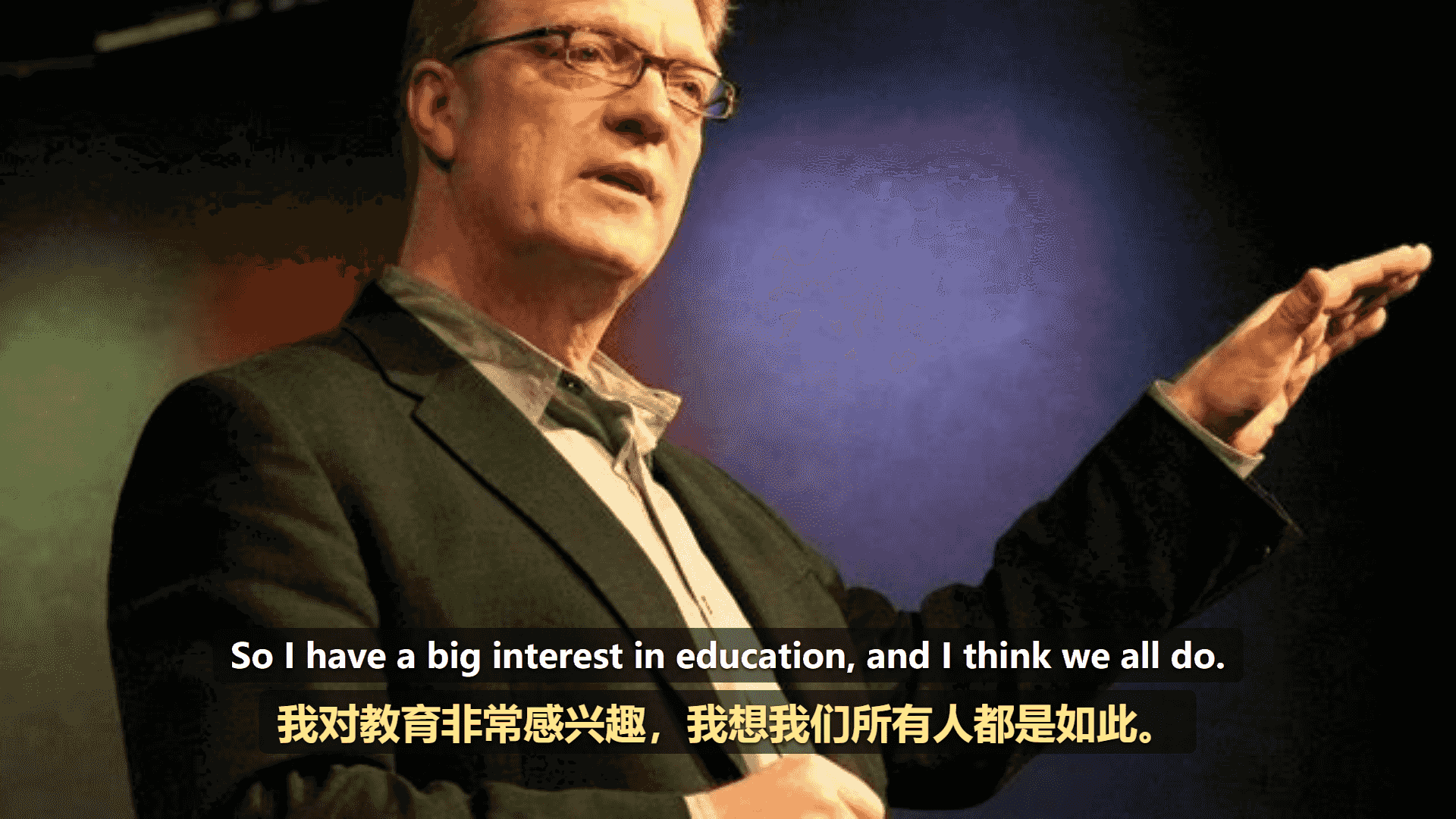
Frame: NASA, International Space Station, public domain画面:NASA 国际空间站摄,公有领域
Three steps to bilingual captions
三步开启双语字幕
It reads the video's real caption track, translates it, and renders both languages in one tidy overlay you can style and drag.
它读取视频真实的字幕轨道,翻译后把两种语言渲染在同一层整洁的字幕里,样式可调、位置可拖。
Installing opens one page of its own first — a short Getting started. Close it and go to a video; nothing on it has to be filled in.
装好之后会先自己打开一页「新手入门」。关掉它去看视频就行,那一页上没有任何非填不可的东西。
Your language pair
你的语言组合
Nothing to set first: the translation language is worked out from your browser when you install, and the engine starts on Auto (recommended). The popup is where you change either — 50 languages, and you decide which of them the menu lists. A live preview shows the result as you tweak.
不用先设什么:装好时译文语言就按你的浏览器算好了,引擎停在「自动(推荐)」。弹窗是你改它们的地方——共 50 种语言,菜单里列出哪几种由你决定。实时预览会随你的调整即时呈现效果。
Play any video
播放任意视频
Press play on any YouTube™ video. Captions turn on by themselves when the video has them, and the player-bar button toggles the overlay on or off.
在任意 YouTube™ 视频上点击播放。视频本身有字幕时会自动开启,播放栏上的按钮可随时开关字幕层。
Read both lines
同时读两行
The original language sits on one line, your translation on the other — one non-overlapping layer that switches sentence by sentence.
原文占一行,你的译文占另一行——同一层字幕互不重叠,逐句切换。
No more subtitle soup
告别字幕一团糊
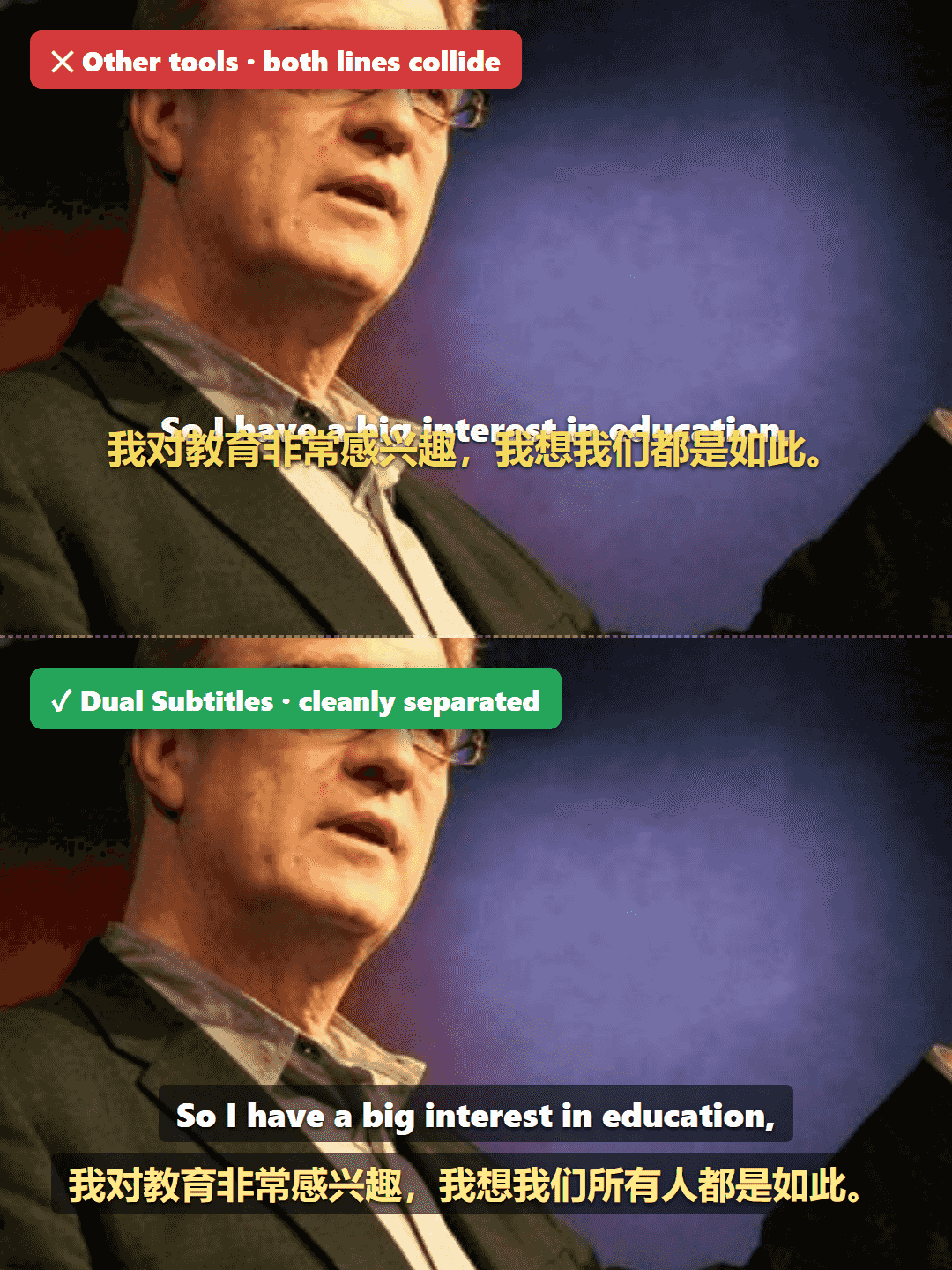
Other tools stack a second track on top of YouTube's own captions and they collide into a blob. This extension hides YouTube's native layer and renders one clean overlay instead.
其他工具会在 YouTube 自带字幕上再叠一层,两者撞在一起糊成一团。本扩展会隐藏 YouTube 的原生字幕层,改为渲染一层干净的字幕。
- Line 1第一行
Original language, at full strength — straight from the video's own caption track.
原文,完整清晰——取自视频自带的字幕轨道。
- Line 2第二行
Your translation, in a dimmer tint underneath, so the two read as two lines.
你的译文,以稍淡的色调置于下方,两行一眼分得开。
YouTube™'s own caption layer is turned off, so only one set of subtitles is drawn.
YouTube™ 自带的字幕层已关闭,因此画面上只有一套字幕。
- Rendered from the timed caption cues, so lines switch by whole sentence — no word-by-word jitter.基于带时间轴的字幕轴点渲染,因此字幕整句切换——不会逐字抖动。
What the layer does, and what you can change
这层字幕能做什么、你能改什么
How to set up your own key怎么配置自带 Key → What's coming next接下来会做什么 →
Translation that lines up with what you hear
和你听到的对得上的翻译
Use YouTube™'s own whole-track translation — one request for the whole track, aligned cue for cue — and when a track can't be translated, fragmented captions are rebuilt into full sentences before Google translates them. Bring your own API key and each sentence is understood whole, then split back across the subtitles.
使用 YouTube™ 自带的整轨翻译——整轨只要一次请求,逐条对齐——视频不支持翻译时,会先把碎片字幕拼回完整句子,再交给 Google 翻译。也可以填自己的 API Key:整句理解之后再按字幕切回来。
Aligned to the video's timing, and it arrives with the line.
与视频时间轴对齐,和原文一起出现。
Rebuilds fragmented captions into full sentences before translating — also selectable manually.
先把碎片字幕拼回完整句子再翻译——也可以手动选用。
Whole sentences understood by the service you pick, then cut back to the cue — the state shown here.
整句交给你选的那家理解,再按字幕切回来——右边这张图就是它。
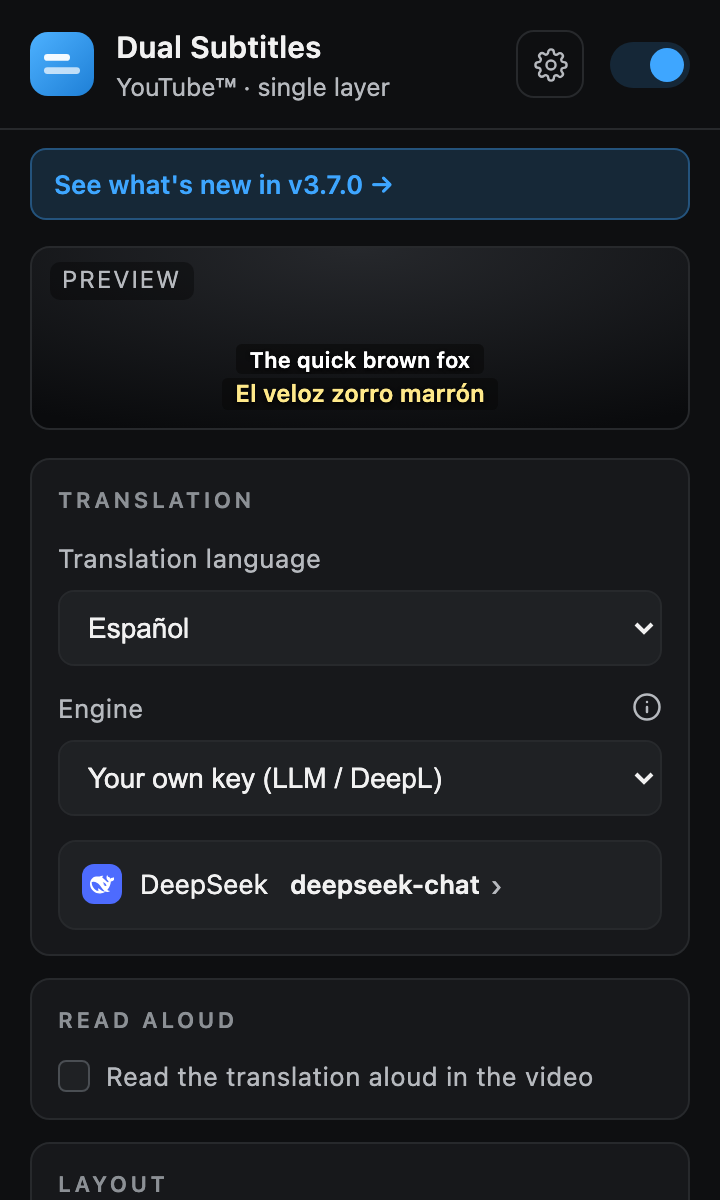
Shown after someone has set up a key of their own. Out of the box the engine reads “Auto (recommended)” and there is no provider line.
这是配好自己的 Key 之后的样子。刚装好时引擎是「自动(推荐)」,下面那行服务商还不存在。
Style every line exactly how you like
每一行都按你的喜好来
Set each line's font — from the fonts really installed on this computer, or a font file you import — size, text color, background color and opacity, and outline; set the spacing between the two lines, and choose which sits on top. A live preview in the popup shows every change instantly.
可分别设置每行的字体(列的是这台电脑上真装了的,也能导入你自己的字体文件)、字号、文字颜色、背景颜色与不透明度、描边;两行之间的行距和哪一行在上也由你定。弹窗里的实时预览会即时呈现每一处改动。
- Per-line font, size, and text color每行独立的字体、字号和文字颜色
- Background color and opacity, outline, and line spacing背景颜色与透明度、描边和行间距
- Choose which line sits on top, with a live preview选择哪一行在上,带实时预览
- 50 translation languages50 种译文语言
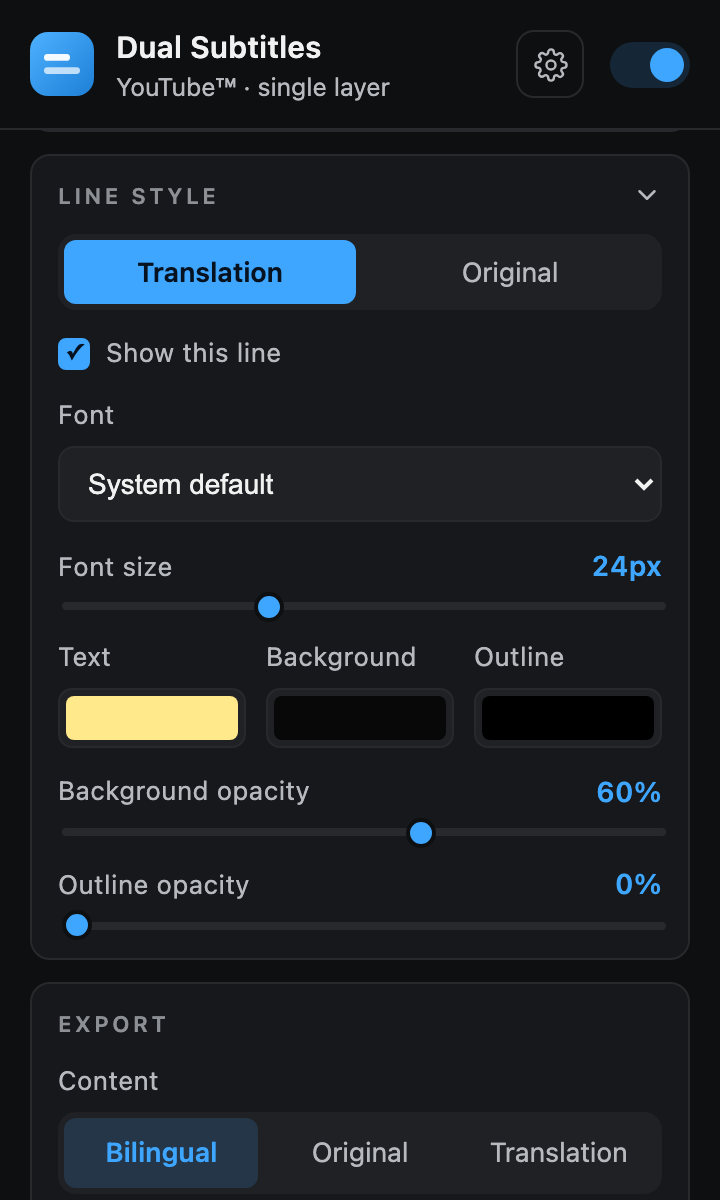
The card opened. In the popup it sits folded into one line until you click it.
这是把这张卡点开之后。在弹窗里它平时折成一行,点一下才展开。
Put the subtitles wherever you want
字幕想放哪就放哪
Grab the handle and drop the subtitle box anywhere on the video — it stays put. Double-click to reset, and it works in fullscreen too. A button in the player control bar turns the overlay on and off.
抓住手柄,把字幕框拖到视频上的任意位置——它会稳稳留在那里。双击即可复位,全屏下同样可用。播放控制栏上的按钮可随时开关字幕层。
- Drag anywhere, position persists; double-click to reset随意拖动,位置会被记住;双击复位
- Works in fullscreen支持全屏
- Player-bar toggle: blue when on, grey when off播放栏开关:开启时为蓝色,关闭时为灰色
- Works on Shorts too, keeping up as you swipeShorts 同样支持,快速滑动也跟得上
- Select text — copy the subtitles when you want to; off by default. That is what the item is called in the player menu, and the popup's Layout card carries the same switch选中复制——需要时把字幕选中复制;默认关着。播放器菜单里那一项就叫这个名字,弹窗「布局」卡里是同一个开关
- Three keyboard shortcuts (subtitles, read-aloud, translation line) — bind them in Settings → About → Set shortcuts三条快捷键(字幕、朗读、译文行)——在设置页 → 关于 →「设置快捷键」里绑
Take the subtitles with you
把字幕随身带走
Download the current video's subtitles as a standard .srt file — the original language, the translation, or both together as a bilingual file. With your own API key it can translate the whole track for you, and it says how many requests that will take before it starts.
把当前视频的字幕下载为标准的 .srt 文件——可选原文、译文,或两者合并成一份双语文件。填了自己的 API Key 之后,还可以让它整片翻译,开始前会先告诉你大约要几次请求。
1
00:00:04,120 --> 00:00:07,480
The best ideas start as questions.
最好的想法都始于提问。
Have it read the translation out loud
让它把译文念出来
Turn on Read the translation aloud in the video and each line is spoken as it appears, in your translation language. The video's own audio ducks under the voice instead of being replaced, so you still hear the room. It starts on your browser's own voices — nothing to sign up for, no key, nothing leaving the machine with the voices installed on it — and five cloud services — or one you run yourself — can be plugged in with a key of yours if you want a better one. A line too long for its subtitle slows the picture a little and runs on into the gap after it, so most lines get to finish; a switch in the settings slows further to try to finish the rest, down to a floor it will not go under.
打开「在视频里朗读译文」,每句字幕出现时就用你的译文语言念出来。视频原声不会被替换,只是在念的时候压低一点,你仍然听得见现场。默认用浏览器自带的音色——不用注册、不用 Key,用本机装好的音色时什么都不离开这台机器;想要更好的声音,可以接五家云服务,或者你自己跑的那一个。一句话长到装不下时,画面会稍微放慢、借用后面那点空隙,大多数句子能读完;还想让更多句子读完的话,设置里有「尽量每句读完」的开关,它会继续放慢,但有一个不再往下走的底线。
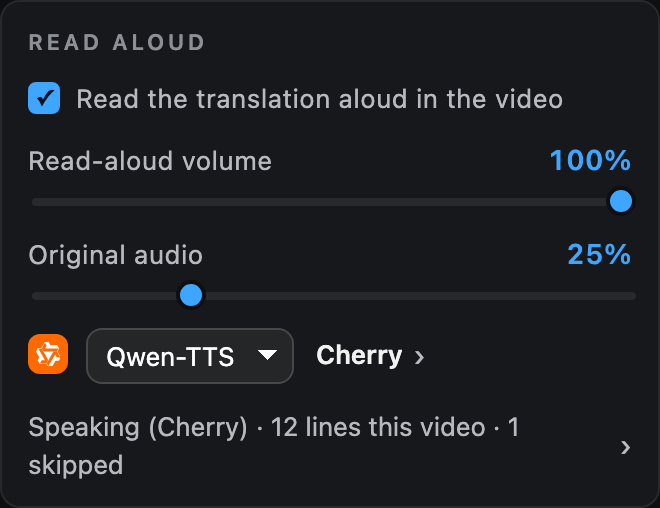
Shown with read-aloud switched on and a cloud voice chosen. Out of the box the card is the switch alone — the sliders and the voice picker appear once you turn it on.
这是打开朗读、并且选了一个云端音色之后的样子。刚装好时这张卡上只有那个开关,打开它,滑杆和音色选择才会出现。
Summarize the video into chapters, on your own key
用你自己的 Key,把视频总结成章节
Pick Summary in the small menu behind the arrow on the player's subtitle button. The subtitle track is written up as a short TL;DR plus chapters with timestamps you can click to jump. It uses the translation service you set up (your own key, or a model server on your computer), and asks it to write in your translation language. The track is not sent to the provider until you press the button; the panel names the provider and how many parts first.
在播放器字幕按钮上的小箭头菜单里点「总结」,整条字幕轨会收成一段简短的摘要,下面是带时间戳的章节,点一下就能跳到那段。用的是你自己配的翻译服务(自带 Key,或你电脑上的本地模型服务),并会要求它用你的译文语言来写。你没按按钮之前,字幕不会发给那家服务;真要发时,面板会先写清发给哪家、分几段。
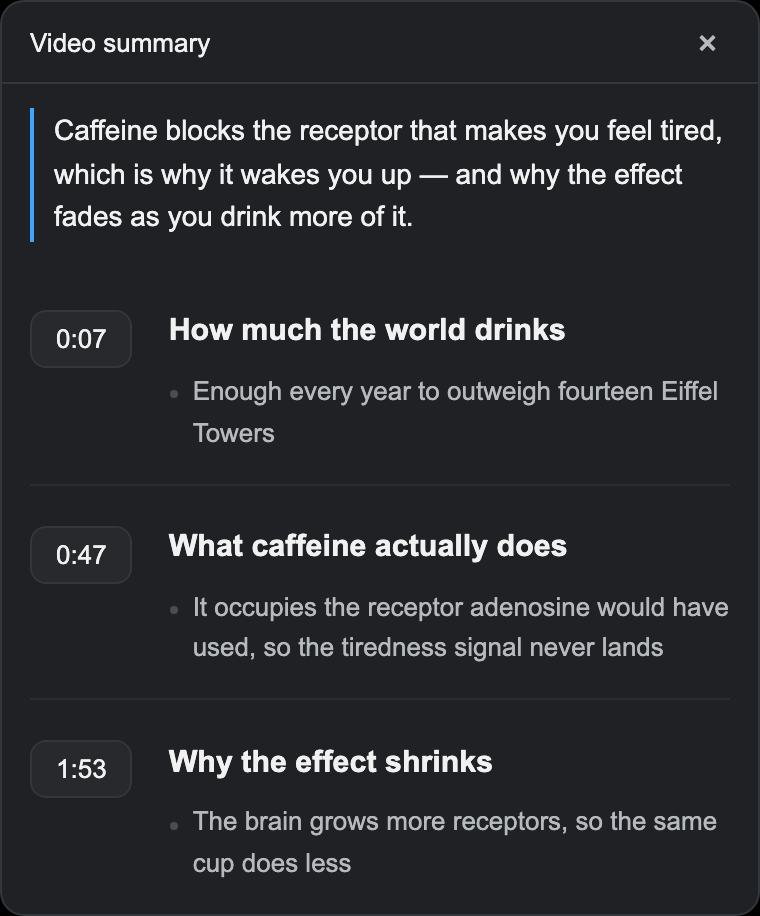
Translate into 50 translation languages
可翻译成 50 种译文语言
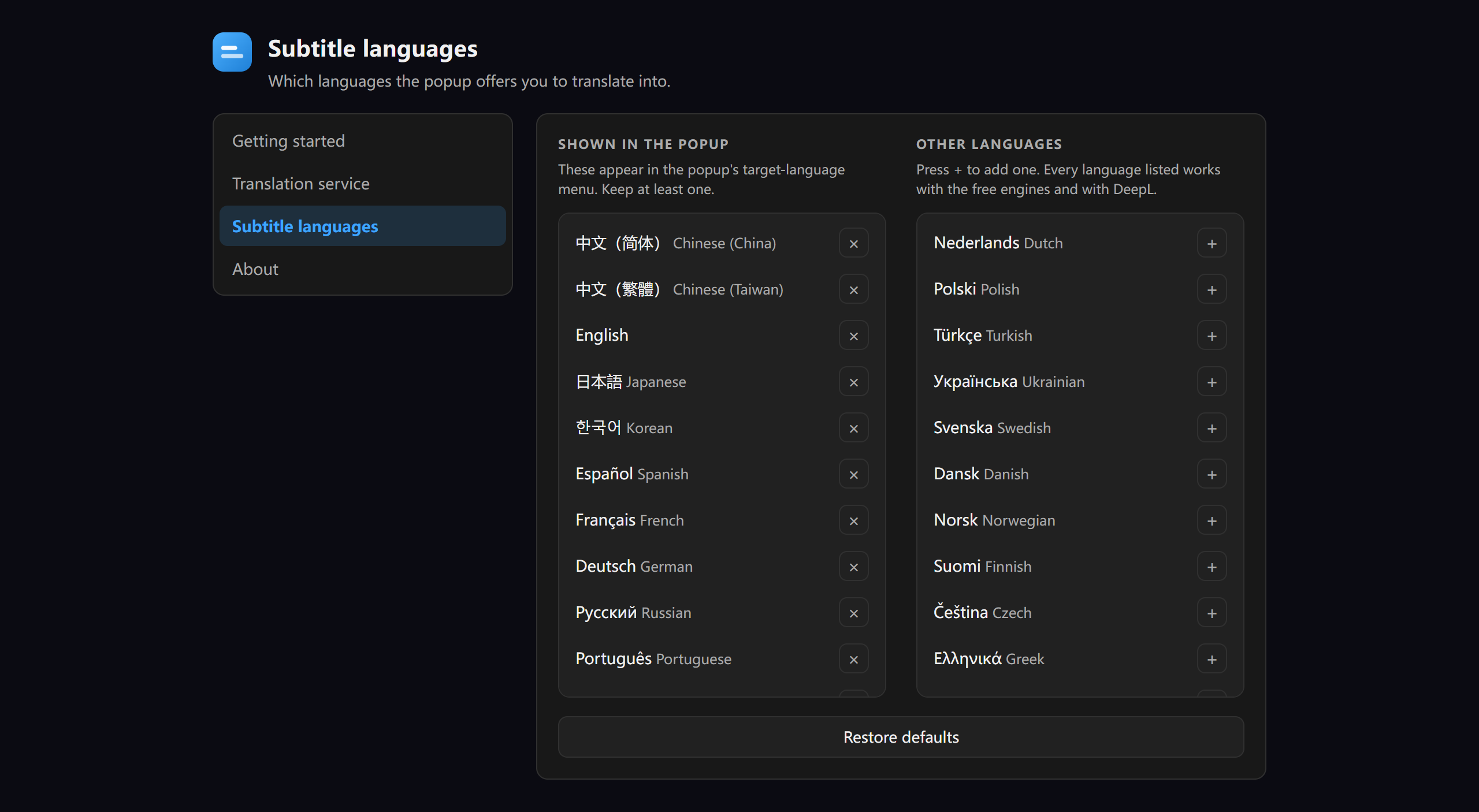
The popup's menu is yours to edit: keep the ones you use, add any of the rest.
弹窗里的下拉由你决定:常用的留着,其余的随时加进来。
The extension's own interface speaks 44 languages too — it follows your browser, or Settings → About → Interface language sets it by hand.
扩展自己的界面也有 44 种语言——跟随浏览器,或在设置页 →「关于」→「界面语言」里手动指定。
Same card offers six looks for the extension’s own two pages — Default, Neon Terminal, Ember, Mocha, Ink and Dusk. The subtitles on the video keep whatever you set in Line style.
同一张卡上还能换这个扩展自己的外观——默认、霓虹终端、余烬、摩卡、墨、暮色六套。视频上那两行字幕,仍用你在「行样式」里设的那套。
Your captions leave the tab only when you send them
只有你自己选了,字幕才会离开这个标签页
- No analytics in the extension. It sends no usage data to us.扩展本身不做统计分析。它不会把使用数据发给我们。
- This website, which is not the extension, loads Cloudflare Web Analytics.这个网站(它不是扩展)会加载 Cloudflare Web Analytics。
- The extension does not track you, and there are no accounts. Nothing to sign up for.扩展不统计你,也没有账号。无需注册任何东西。
- Caption text goes only to services you choose: the translation service, plus the speech provider if you turn read-aloud on and the provider you set up if you ask for a summary.字幕文本只发给你自己选的服务:翻译服务,以及开了朗读时你选的语音服务商、点了总结时你配置的那一家。
- Open source under MIT. Read every line on GitHub.基于 MIT 许可开源。每一行代码都能在 GitHub 上查看。
Install from source
从源码安装
Prefer to run it unpacked? Clone the repo, open your browser's extensions page, enable developer mode, and load the folder.
更想以未打包方式运行?克隆仓库,打开浏览器的扩展页面,开启开发者模式,然后加载该文件夹即可。
chrome://extensions → Developer mode → Load unpacked
chrome://extensions → 开发者模式 → 加载已解压的扩展程序
Manifest V3 · works on Chrome, Edge, and other Chromium browsers 111+.
Manifest V3 · 支持 Chrome、Edge 及其他 111+ 的 Chromium 浏览器。
Good questions, honest answers
好问题,实在答
Is my caption data private?我的字幕数据私密吗?
Yes. The extension has no analytics, no tracking, and no accounts. Caption text is sent only to services you chose: the translation service in use and — only if you turn them on — the speech provider for read-aloud and the provider you configured for summaries. Nothing else leaves your browser, and nothing goes to the developer. It is open source under the MIT license, so you can verify this yourself.
是的。扩展没有任何统计分析、追踪或账号。字幕文本只会发送到你自己选的服务:正在用的翻译服务,以及只在你开启时,朗读用的语音服务商和你为总结配置的那一家。其余内容都不会离开你的浏览器,也没有任何东西发给开发者。它基于 MIT 许可开源,你可以自行核实。
Which browsers does it work on?它支持哪些浏览器?
Chrome, Edge, and other Chromium-based browsers on version 111 or newer. It's a Manifest V3 extension. You can install it from the Chrome Web Store, or load it unpacked from the source on GitHub.
支持 Chrome、Edge 以及其他基于 Chromium、版本 111 或更高的浏览器。它是一个 Manifest V3 扩展。你可以从 Chrome Web Store 安装,也可以从 GitHub 上的源码以未打包方式加载。
Does it cost anything?它收费吗?
No. There is no paid tier, no subscription, and no account to create, and the extension is open source under the MIT license. The built-in engines cost you nothing. If you plug in your own API key, that provider bills you directly — the payment does not go through us.
不收费。没有付费档位、没有订阅,也不用创建账号,扩展本身基于 MIT 许可开源。内置的翻译引擎不花你的钱。如果你填了自己的 API Key,那笔钱是服务商直接向你收的——不经过我们。
Does it work with auto-generated captions?它支持自动生成的字幕吗?
Yes. It reads the video's real caption track, and it can turn captions on for you automatically. If needed, it also falls back to reading the on-screen caption text, and when YouTube switches videos without reloading the page, it attaches itself again.
支持。它会读取视频真实的字幕轨道,并能自动为你开启字幕。必要时还会回退到直接读取屏幕上显示的字幕文本;YouTube 不刷新页面就换视频时,它会自己重新挂上去。
Will it slow the video down?它会让视频变卡吗?
The subtitles are drawn as an overlay; the video file is not modified. YouTube™'s whole-track translation arrives with the line, and the Smart sentences engine prefetches ahead of playback, so the second line usually keeps up; when a service is busy it shows an honest “…” rather than a stale line. Lines are rendered from the timed cues, so they switch by whole sentence without flicker. One exception, and it is deliberate: with read-aloud on, a line that runs long slows the picture a touch so the voice can finish — the “Try to finish every line” switch makes that more noticeable.
字幕是叠加在画面上的一层,不改动视频本身。YouTube™ 的整轨翻译和原文一起出现,智能整句引擎也会在播放前提前预取,所以译文一般跟得上;服务繁忙时它会老实显示一个「…」,而不是把上一句旧译文摆在那里。字幕基于带时间轴的轴点渲染,整句切换、不会闪烁。 只有一种情况是故意的:开着朗读时,句子长到读不完,画面会稍微放慢一点让声音念完——打开「尽量每句读完」那个开关后会更明显。
The subtitles cover the video — how do I move them?字幕挡住画面了,位置怎么调?
Hover the subtitle box and drag the six-dot grip at its top-left corner to put it anywhere on the video — the position is remembered (and synced with your browser account, like the other settings), and double-clicking the handle resets it (the popup's Layout card has a Reset position link too). The popup also has top / center / bottom presets, plus per-line font size and spacing. Since v3.5.0 the box automatically steps above the progress bar while the player controls are visible.
把鼠标移到字幕框上,按住左上角那块六点手柄就能把它拖到画面任意位置——位置会记住,双击手柄可复位(弹窗「布局」卡里也有「重置位置」)。弹窗里还有顶部/居中/底部三个预设,以及每行的字号、行距等设置。从 v3.5.0 起,播放器控件出现时字幕框还会自动上移避开进度条。
Why do translations sometimes pause or not show up?为什么翻译有时不出来、或者停一下?
The Smart sentences engine uses Google's free public endpoint. Under heavy use — long videos, lots of seeking — it may briefly rate-limit. The extension notices, slows down and retries on its own: the translation line shows "…" while it waits, and translations resume automatically, usually within seconds to a couple of minutes. Already-translated sentences stay cached. YouTube's own whole-track translation can be limited too — when that happens the extension falls back to the sentence engine and comes back for the whole-track version a little later. If it still shows nothing, Settings → About → Something not working → Copy diagnostic info gives you the facts to send with a report.
智能整句引擎走的是 Google 免费公共接口,重度使用(超长视频、频繁拖进度条)时可能被短暂限流。扩展会自己发现并放慢重试:等待期间译文行显示「…」,翻译通常在几秒到一两分钟内自动恢复。已翻译过的句子有缓存,还在。YouTube 自带的整轨翻译同样可能被限流——真遇上时扩展会先用整句引擎顶上,过一会儿再回头去要整轨译文。还是什么都不出来的话,设置页 →「关于」→「遇到问题」→「复制诊断信息」会把该带上的事实都给你,贴进报告就行。
Is the feature I want planned?我想要的功能有没有计划?
The roadmap says what is planned, what is being built, and what is not happening yet — with the reason for each. If what you want is not on it, say so: most of what is on that list started as somebody's message.
开发计划页写着计划做什么、正在做什么、暂时不做什么——每一条都写了原因。如果你想要的不在上面,说一声就行:那个列表上的大多数条目,最初都是别人发来的一句话。
Start watching in two languages today
今天就开始用双语看视频
Add it from the Chrome Web Store. Free, open source, and no account required.
从 Chrome 应用商店添加。免费、开源,无需账号。
Free免费 · MIT · no account本扩展无需注册 · Chromium 111+